How to make an ATS-friendly resume that gets read
What an applicant tracking system actually does, and how to write a resume that gets through it without tricks.
By Kevin Tang · Updated September 2026
The short answer
An ATS-friendly resume is a clean, single-column document that an applicant tracking system can parse and a recruiter can find. Save a text-based PDF or .docx (never a scanned image), use standard section headings (Experience, Education, Skills), and skip tables, sidebars, text boxes, and design-tool layouts that scramble when parsed. Then match the job: mirror the exact skills and tools from the posting, in its own words, wherever they are genuinely true of you, so the recruiter's keyword search surfaces you. An ATS does not auto-reject you; it ranks and filters, and a person still decides. The failure mode is invisibility, not rejection. Test it by copying your PDF into a plain text editor: if the text stays in order and nothing disappears, the parser can read it too. In our own test, an image-only PDF gave two common parsers no readable text at all.
If you have heard that an applicant tracking system (ATS) auto-rejects three quarters of resumes before a human sees them, you can relax: that number is a myth that sells resume products. The figure is usually credited to Preptel, a resume-optimization vendor that shut down in 2013, and no study behind it has ever been found. The truth is simpler and more useful. An ATS does not decide you are unqualified. It just stores and sorts resumes, and a resume it cannot read, or cannot match to the search a recruiter runs, quietly never surfaces. An ATS-friendly resume is not about beating a gatekeeper. It is about being readable and findable. (Christine Assaf, HRTact, 2020)
What an ATS actually is, and is not
An applicant tracking system is a database with a search box. When you apply, it parses your file into fields (name, company, title, dates, skills), stores the result, and lets a recruiter search and filter that pile. It does not read for meaning, and it does not send rejections on its own. A person still makes the call. The failure mode is not rejection, it is invisibility: a resume that parses into garbage, or misses the words the recruiter searches for, sits in the database and never gets looked at.
ATS resume format: build a file the parser can read
Half of getting through an ATS is a clean file it can turn into text without scrambling. Parsers are literal, and anything clever tends to break them. Keep the structure boring and bulletproof:
- One column, in reading order. Columns and sidebars get reordered when the parser flattens them to text, and narrow columns invite hyphenated words that no longer match a search.
- Standard section headings: Experience, Education, Skills. Parsers use headings like these to sort your text into fields.
- No tables, text boxes, or design-tool layouts, and no essential text in headers, footers, or images. In our test below, a table detached dates from their jobs in one parser, and text boxes came out in the wrong order in both.
- Real bullet characters and a standard font, with no icons standing in for words.
- Save as a text-based PDF or .docx, never a scanned image or a screenshot.
Do tables and columns break ATS parsing?
They can, and the risk depends on how the file was built more than on how it looks. A parser does not see your page the way you do. It pulls the text out of the file, then guesses which words belong to which field. Some parsers follow the order the text is stored in the file; others read across the page line by line. A sidebar, a text box, or a column is exactly where those two orders disagree, and that is where job titles detach from their dates, skills land in the middle of a job, and the two halves of a hyphenated word land in different places.
The fix is structural, not cosmetic. Put everything in one column, in reading order, and let spacing and bold headings do the job a grid was doing. If a section only works as a table, turn each row into a short line of plain text instead.
What happens when a parser reads different resume layouts?
We tested it on 30 September 2026. We built the same resume four ways in LaTeX (single column, a two-column sidebar, a table, and loose text boxes placed out of reading order to imitate how design tools store them), plus an image-only copy of the single-column file, and ran every file, along with a real resume Arial typeset, through two parsers: pdf-parse 2.4.5, the library Arial itself uses to read uploads, and pdftotext from Poppler 26.04 in its default mode. For each file we checked whether 20 key phrases came back intact (the name, headline, and summary; both job titles and employers; the degree and university; three skills; and a key phrase and number from each bullet), then read every output for order. The test files are below, so you can run them through any parser yourself.
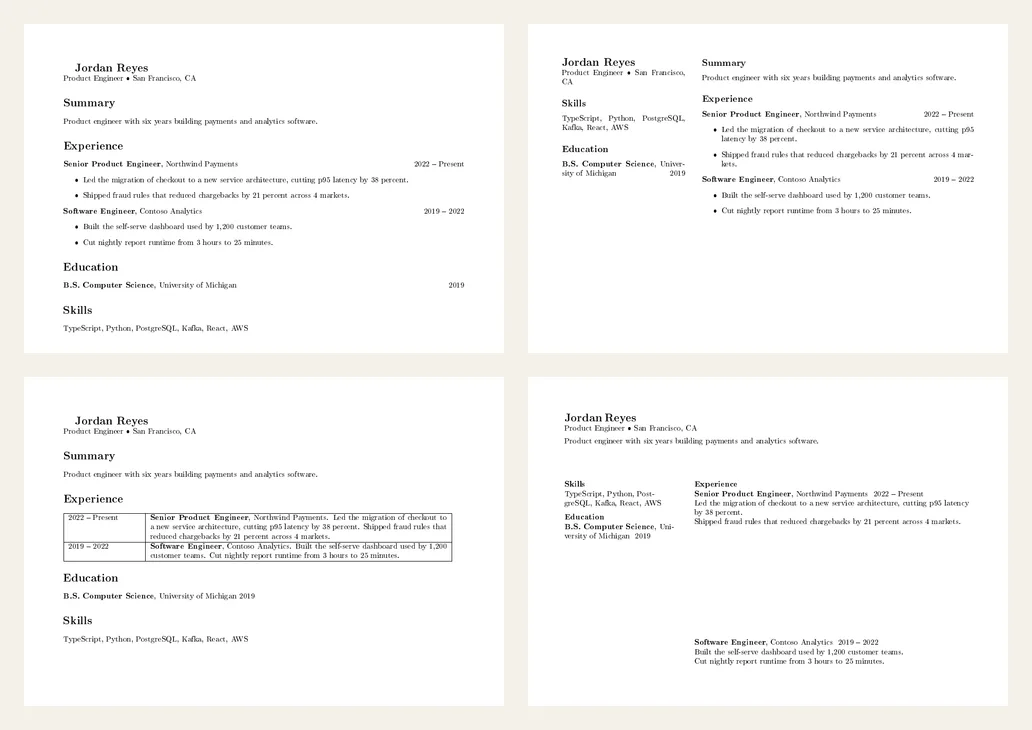
Download the test files (PDF)
| Layout | pdf-parse (used by Arial) | pdftotext (Poppler) |
|---|---|---|
| Single column | 20 of 20 phrases, in reading order | 20 of 20. In order, except the degree year moved to the very end, after Skills |
| Two-column sidebar | 19 of 20. Skills and education came out as one block ahead of experience; "University of Michigan" split into "Univer- sity" | 19 of 20. The sidebar interleaved with the Summary and Experience headings, "Univer" and "sity" landed apart, and the second job's dates moved to the end |
| Table | 20 of 20. Each date printed right before its job title | 20 of 20, but both date ranges printed together ahead of the two jobs, detached from the roles they belong to |
| Text boxes | 18 of 20. The second job came out first, before the candidate's own name; "PostgreSQL" and "University" split by hyphens | 19 of 20. Skills and experience interleaved line by line, and the university name split around a job's dates |
| Image-only PDF | 0 of 20. No text layer, nothing to read | 0 of 20 |
| A resume Arial typeset (a different sample) | Every section in page order; date ranges kept their dashes | Every section in page order, dashes kept; right-aligned locations such as "London, ON" moved below the next bullet |
Text-box layout, as pdftotext read it (first lines, unedited)
Jordan Reyes

Product Engineer [U+0088] San Francisco, CA
Product engineer with six years building payments and analytics software.

Skills

Experience

TypeScript, Python, PostgreSQL, Kafka, React, AWS

Senior Product Engineer, Northwind Payments

Education
B.S. Computer Science, Uni-

2022 [U+0015] Present
Led the migration of checkout to a new service architecture, cutting p95 latency
by 38 percent.
Shipped fraud rules that reduced chargebacks by 21 percent across 4 markets.

versity of Michigan 2019
Text-box layout, as pdf-parse read it (first lines, unedited)
Software Engineer, Contoso Analytics 2019 [U+0015] 2022
Built the self-serve dashboard used by 1,200 customer teams.
Cut nightly report runtime from 3 hours to 25 minutes.
Jordan Reyes
Product Engineer [U+0088] San Francisco, CA
Product engineer with six years building payments and analytics software.
Skills
TypeScript, Python, Post-
greSQL, Kafka, React, AWS
Only the single-column files came through both parsers essentially intact, and even there one parser moved a stray year. Every other layout broke in at least one parser, and the two parsers rarely broke the same way. The table kept every word, but one parser pulled both date ranges away from their jobs, which is how a recruiter's system ends up unsure which role you held when. The text-box layout, the one that looks most polished, came out scrambled in both. Words split across lines stayed split: a hyphenated "Univer- sity" no longer matches a search for your school. Those splits come from LaTeX's automatic hyphenation (Word and Google Docs do not hyphenate by default), but the reading-order problems come from the layouts themselves. The image-only file returned nothing at all. Our test files also had a flaw of their own: the dash in every date range came out as an unreadable control character (shown as [U+0015] in the output above; the bullet between title and city became [U+0088]), a side effect of the font setup we used. Two parsers are not every ATS, and commercial systems run their own, so treat these results as a floor rather than a guarantee: if a simple parser scrambles your file, assume a recruiter's system can too.
PDF or Word: will an ATS read a PDF?
Yes, as long as the PDF has a real text layer. Major applicant tracking systems accept PDFs alongside Word files; Greenhouse, for example, takes .doc, .docx, .pdf, .rtf, and .txt uploads. What fails is a PDF with no text in it: a scanned page, a photo of a resume, or a design export that turned the words into shapes. In our test above, an image-only PDF gave both parsers zero readable words. Some commercial systems add optical character recognition for scans, and many keep the file as an attachment even when parsing fails, but you cannot count on either, so send a file with real text. (Greenhouse Support: supported upload formats)
There is a simple test. Open the PDF, select all, copy, and paste it into a plain text editor. If you get your words back in a sensible order, a parser can read them too. If you get nothing, gibberish, or sections in the wrong order, fix the file before you send it. When a posting explicitly asks for .docx, send .docx; otherwise a text-based PDF keeps your layout exactly as you set it.
How long should an ATS resume be?
The parser does not care about length, but the recruiter reading the shortlist does. For most people with under about ten years of experience, one page is the right target: it forces you to keep only the bullets that prove you can do the job you are applying for. Longer careers, academic CVs, and some senior or federal roles are the exceptions, and there a second page is fine when every line on it earns its place. Cutting to one page is the same work as Chapter II: keep evidence, drop duties.
Chapter II of the guide covers this in the flow of writing bullets; the checklists above are the short version to keep beside you while you format.
Resume keywords: match the words the job uses
The other half is the search. Recruiters filter the pile by keywords pulled straight from the job description, so your resume has to contain the same terms, in the same words, where they are genuinely true of you. This is not stuffing. It is speaking the language the role is written in.
- Pull the skills and tools that repeat across several postings for your target role. Those recurring terms are what recruiters search for.
- Use the posting's exact phrasing. If it says "CI/CD," do not write only "deployment pipelines"; use the term they will search.
- Include both forms once: the acronym and the spelled-out version (for example "SEO" and "search engine optimization").
- Place them where they read naturally: the summary line, a real skills section, and inside bullets that prove you used them.
Reading ten postings to find those terms is Chapter I; doing it fast per application, without rewriting your whole resume each time, is Chapter III.
ATS myths that waste your time, or get you caught
| Myth | Reality |
|---|---|
| White text or hidden keywords beat the parser | Parsers read the hidden text, and recruiters see it the moment they paste your resume. It reads as dishonest and gets you rejected, not hired. |
| More keywords is always better | A wall of skills with no evidence behind them reads as spam to the human waiting on the other side of the parser. |
| One missing keyword auto-rejects you | Mostly false. An ATS ranks and filters; it does not issue verdicts. A recruiter still reviews the shortlist. |
| An ATS cannot read PDFs | Out of date. Major systems accept text-based PDFs. Scanned or image-only PDFs are the ones that fail outright, because there is no text to read; layout still matters, as the test above shows. |
| You need a paid ATS template | No. A clean single-column resume parses fine. Most "ATS-proof" templates sell you formatting you can do yourself in a plain document. |
Test whether your resume is ATS-friendly
You do not need special software to see what an ATS sees. You need thirty seconds and a plain text editor.
Getting past an ATS is not a hack. It is a clean file the machine can read, the right words in the right places, and real evidence behind them. Do that, and the only thing left to win is the seven-second human scan waiting on the other side.